


Rent. Apartments & Homes
4.78.66K Reviews
App Specs
- Version
- 12.6.0
- Updated On
- License
- Free
- Downloads
- 5,000,000+
- Developer
- Rent Group, Inc
- Categories
- House & Home
- Platform
- Android, iOS
Screenshots
 Analysis by AppCompare
Apartment hunting is a burst of decisions followed by a lot of waiting: comparing neighborhoods, checking costs, and trying to remember which listing had the useful details. I like Rent. Apartments & Homes as a starting point because it brings rental listings into one place and gives me tools to narrow a broad search. Its first-week appeal is easy to understand; the more important question is whether it remains useful once the novelty wears off and the search becomes a routine.
A quick start, with a plan in mind
Rent. is a free House & Home app from Rent Group, Inc. It has a 4.6 average from around 124,000 ratings, and more than 5 million installs. Those figures suggest that it has found a substantial audience, but they cannot tell you whether the listings suit your neighborhood or whether the app fits your habits. I would judge it by how well it helps me turn a vague search into a manageable shortlist.
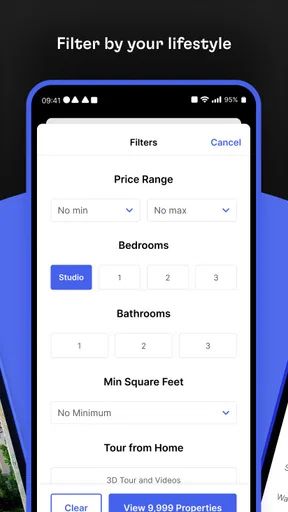
For the first pass, I’d set a realistic location and budget, then use the bedroom and amenity filters to remove places that clearly do not fit. A useful trick is to avoid adding every preference at once. Start with the requirements that could rule out a home—such as the area, affordability, or a practical need like parking—and only then narrow by nice-to-haves. That keeps a search from becoming so specific that potentially suitable listings disappear before you have compared them.
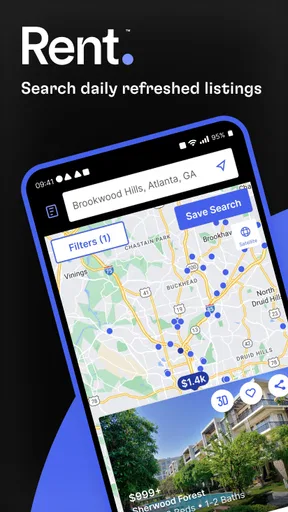
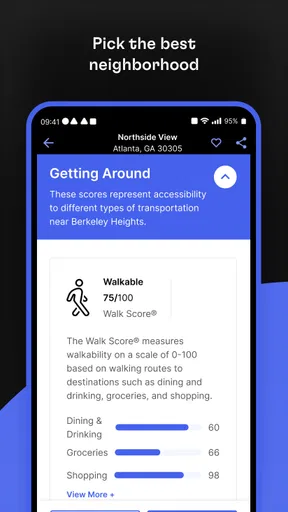
The map view is especially useful when an address matters as much as the property itself. A listing can look appealing in a photo and still be inconvenient for a commute or everyday errands. I’d use the map to check the surrounding area, then treat nearby schools and public transport details as prompts for further research rather than a complete picture of the neighborhood. For a move to an unfamiliar part of town, that extra context can make the early browsing stage more purposeful.
What makes the search feel practical
The first thing that caught my eye was how clean and modern the interface is. Navigating through the Rent. Apartments & Homes app is a breeze. The layout is intuitive, which means you won't be fumbling around trying to figure out where everything is. Within moments, I was deep into my apartment hunt, and it felt like a seamless experience.
Robust Search Features
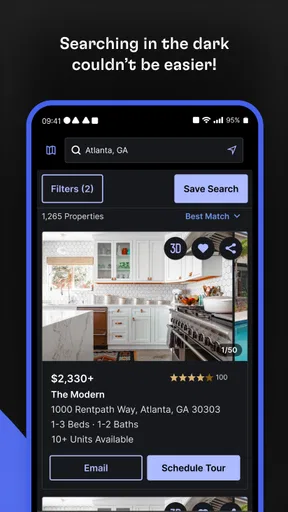
One of the standout features is the robust search functionality. You can filter listings by location, price, number of bedrooms, and more. What I loved most was the map search feature. You can literally see where each listing is located, making it super easy to find a place in your desired neighborhood. Plus, with the advanced filters, you can even search for amenities like pet-friendliness and parking availability. It’s like the app just gets what you need.
Filters are most valuable when I use them to make trade-offs visible, not to pretend the search has a perfect answer. If two homes meet the basics, I’d loosen one optional filter and see what else appears; a slightly different layout or location might be a better everyday fit. Conversely, if a non-negotiable need is missing, I wouldn’t let attractive photos or a long feature list distract me from that gap. The app helps organize choices, but the priorities still have to come from you.
Worth Reading Before You Choose

Flipboard Shows What News Apps Must Do Beyond the Feed

Switching to Android Auto Means Rethinking Your Driving Routine

Google Calendar Makes a Crowded Week Easier to Manage

Ludo King Makes the Most of the Minutes Between Plans

Baby Panda World Brings Quick Play to Modern Phones, but Its Game Library Feels Busy

ESPN’s Live Game View Makes Following Close Games Easier
Detailed Listings
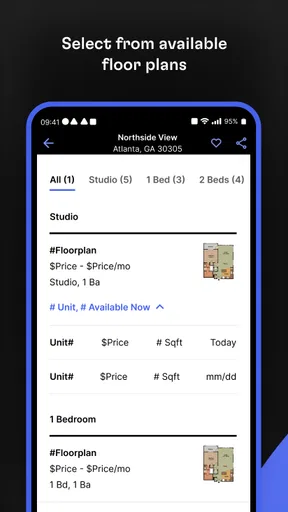
Each listing provides rich details that help paint a full picture of the property. High-quality photos, detailed descriptions, and even 3D tours in some cases. The app also offers information on nearby schools and public transport, which is a nice touch if you're new to the area. I found myself spending hours just browsing through listings and planning my future home setup.
Photos and tours are useful for deciding which places deserve a closer look, but I would not treat them as substitutes for an in-person viewing. Pictures can make rooms feel larger or leave practical questions unanswered. Before contacting a property manager, I’d write down the details that matter to me—what is included, how a particular space is used, or whether a feature shown in a photo comes with the rental. That way, browsing feeds into a decision instead of becoming an evening of attractive but inconclusive scrolling.
User-Friendly Features
Another feature worth mentioning is the save and compare function. You can save your favorite listings and compare them side by side. This was incredibly handy for someone as indecisive as me. No more flipping between tabs or trying to remember which one had the walk-in closet.
A shortlist becomes more useful if I compare homes against the same handful of questions rather than relying on a vague overall impression. I might note whether each one fits my budget, how its location works for my routine, and what I still need to ask. Saved listings are also a practical way to pause a search without losing the options that caught my attention. They help with organization, though they do not remove the need to revisit details or check whether a home is still relevant when I’m ready to act.
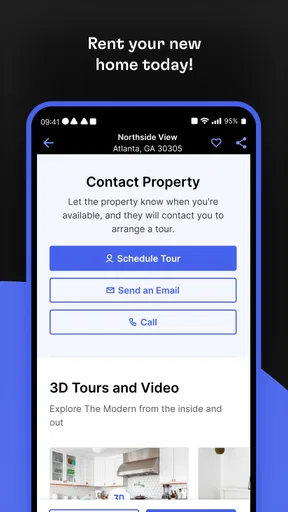
On top of that, the app allows direct contact with property managers. You can message them within the app to ask questions or set up viewings. It streamlines the communication process, saving you from unnecessary emails or phone calls.
For a realistic weekday search, I’d spend a few minutes checking new options during a break, save anything that clears my basic requirements, and send focused questions about the strongest candidates later. That is more manageable than trying to make a full decision from a phone screen. If I am coordinating a move with someone else, the saved shortlist can also give us a concrete set of homes to discuss instead of sending each other a stream of unrelated listings. The useful habit is to treat the app as a place to screen and organize, then use direct contact and viewings to verify the important details.
Notifications and Updates
For those who like to stay ahead of the game, the app offers notification features. If a new listing pops up in your favorite area or a price drops on a place you’ve had your eye on, you get instant alerts. It’s like having a personal assistant keeping tabs on the real estate market for you.
Does it keep earning a place on your phone?
Notifications can make the app useful beyond the first burst of browsing, especially when you are actively looking and want to notice changes without repeatedly running the same search. I’d keep alerts tied to a focused area or shortlist so they remain actionable. Too many broad updates can turn a helpful nudge into noise, and an alert is a reason to revisit a listing, not a guarantee that it is still the right option or that it will suit you in person.
Where it fits among rental-search options
Compared with searching through general classifieds, a dedicated rental app gives the process more structure: location and property filters, map browsing, listing details, saved homes, and a direct way to contact property managers are gathered around the same task. That is convenient when I’m comparing several possible homes. A broad search engine or local community group may still be useful for neighborhood knowledge or leads that do not appear in a particular app, while checking a property manager’s own information can help when I want to confirm details. I see Rent. as a strong discovery and organizing tool, not a reason to rely on one source alone.
Its recurring value depends on where and when you are searching. During an active move, new listings, price changes, and saved comparisons can make it worth returning to regularly. Once you have found a place, those same tools naturally matter less; this is a practical search app, not something I would expect to open every day indefinitely. For a person casually watching rental options, it may be enough to check occasionally rather than keep frequent alerts switched on.
Small habits that reduce search fatigue
The main friction is not complicated navigation; it is the nature of apartment hunting. Repeatedly seeing homes that miss one important requirement can make any listing feed feel tiring. I’d set a clear stopping point for each search session, save only genuine candidates, and revisit the criteria if the results are consistently unhelpful. If the area is especially competitive or the search is urgent, I would also check other local sources and contact managers promptly instead of assuming that an app alert will do the work for me.
There is also a limit to what a listing can establish. A description and photos can help me decide whether a viewing is worthwhile, but questions about the actual condition, terms, and fit for my routine need direct follow-up. I would avoid making a commitment based only on an appealing screen presentation. The app is most helpful when it shortens the path to a sensible question or viewing; it is less helpful if I expect it to replace judgment or independent checks.
Who should use it—and who may prefer another route
I’d recommend trying it if you are comparing apartments or rental homes and want an organized way to filter, map, save, and contact property managers. It can be especially handy for someone moving to an unfamiliar area, a renter balancing practical needs such as parking and transit, or a household that wants to compare a few candidates without relying on memory. The Everyone content rating makes it broadly suitable for general audiences, and version 11.9.0 supports devices running Android 8.0 or later.
It is not the right choice as your only source if you need a complete view of every rental opportunity, have a very specific local requirement that standard listing filters do not capture, or want neighborhood advice from people who live there. In those cases, I’d pair it with local research and direct questions. If you are not currently planning a move, the app may simply lose relevance after the search ends; that is not a flaw so much as the natural limit of a tool built around a particular life task.
In conclusion, the Rent. Apartments & Homes app is a must-have for anyone in the market for a new place. It’s easy to use, packed with features, and makes apartment hunting feel less like a chore and more like an adventure. So, if you're ready to find your next home sweet home, give this app a download and start exploring. Happy hunting!
Pros
- User-friendly interface with intuitive navigation.
- Wide variety of listings available nationwide.
- Advanced search filters for precise results.
- Real-time updates on new listings.
- In-app communication with landlords.
Cons
- Limited international listings.
- Some listings lack detailed photos.
- Occasional app performance lags.
- In-app ads can be intrusive.
- No offline mode for browsing.
FAQs for Rent. Apartments & Homes
What features does the Rent. Apartments & Homes app offer?
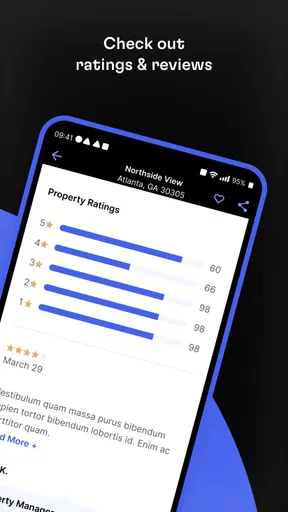
The Rent. Apartments & Homes app provides users with a comprehensive search platform to find rental properties. Key features include customizable search filters, detailed property descriptions, high-quality photos, virtual tours, and user reviews. Additionally, users can save favorite listings and receive notifications about new listings that match their criteria.
Is the Rent. Apartments & Homes app free to use?
Yes, the Rent. Apartments & Homes app is free to download and use. However, it may offer in-app purchases or premium features that enhance the user experience, such as advanced search filters or ad-free browsing. Always check the app store for any specific pricing details associated with these features.
How accurate are the listings on Rent. Apartments & Homes?
The app strives to provide accurate and up-to-date listings by partnering with reputable landlords and real estate agents. Users should verify the details by contacting the listing agent directly through the app. Additionally, the app includes user reviews to help validate the reliability of the listings.
Can I apply for rentals directly through the app?
Yes, the Rent. Apartments & Homes app often allows users to apply for rentals directly through the platform. This feature streamlines the application process by enabling users to submit necessary documents and application forms digitally, though the availability of this feature can vary by listing and region.
How does the app ensure user data privacy?
The Rent. Apartments & Homes app prioritizes user privacy by implementing robust security measures. It employs encryption protocols to protect personal information and offers transparent privacy policies. Users are encouraged to review these policies and adjust their privacy settings within the app to suit their comfort levels.


